Cloud Data Engineering
ETL Orchestration on AWS with Redshift, Glue & Step Functions
A fully automated, serverless ETL pipeline on AWS that extracts millions of Amazon product reviews from S3, transforms and loads them into Amazon Redshift Serverless, generates analytics aggregations, and exports results to S3 — orchestrated end-to-end by AWS Step Functions with built-in SNS failure alerting.
The Challenge
Building a reliable multi-step ETL pipeline against Amazon Redshift required solving three problems simultaneously: (1) executing a strict sequence of dependent SQL operations — schema creation, data extraction, and analytics aggregation — where any failure should stop the pipeline and alert the team rather than silently corrupt downstream tables; (2) securely routing database credentials to a Glue Python job without storing passwords in code, config files, or environment variables; and (3) keeping the infrastructure fully serverless so the pipeline costs nothing when idle and scales automatically for large review datasets.
The Solution
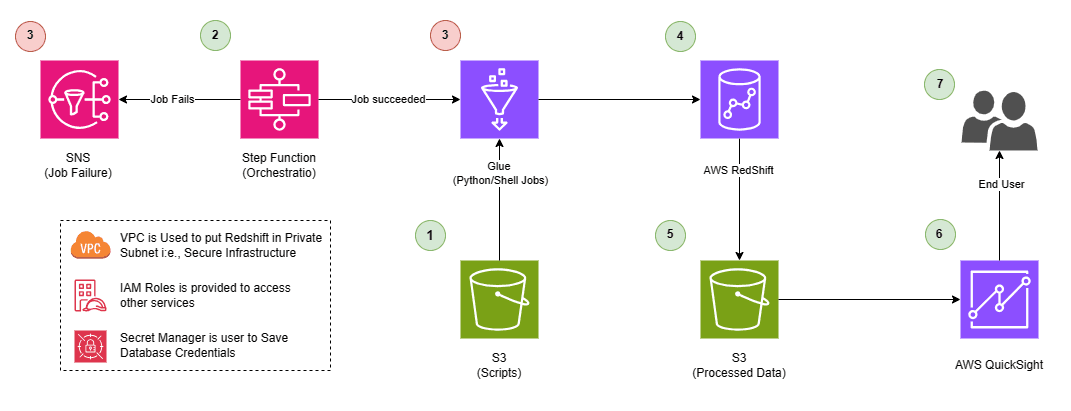
We architected an AWS Step Functions state machine with three sequential Glue task states (SchemaSetupJob → ETLJob → ReportJob), each invoking the same reusable rs_query.py Glue script with a different S3 SQL file path as an argument. Credentials are stored in AWS Secrets Manager and resolved at runtime using the Secrets Manager API — zero plaintext passwords anywhere. The Glue script reads its SQL file from S3, splits on semicolons, and executes each statement against Redshift Serverless via the Redshift Data API, polling until completion. Every state has a Catch block that routes any failure to an SNS NotifyFailure state, which publishes a formatted error message to an email-subscribed topic before the machine terminates with a PipelineFailed state.
Pipeline Architecture
External Schema & Table Setup
The SchemaSetupJob Glue state executes reviewsschema.sql against Redshift Serverless. This creates the external schema amzreviews linked to the Glue Data Catalog, defines the external table with 10 pre-partitioned product categories (Parquet format from the public Amazon Reviews S3 dataset), and creates the internal public.reviews table with DISTKEY on product_id and SORTKEY on review_date for query performance.
Extract, Filter & Load
The ETLJob Glue state executes etl.sql, which reads all columns from amzreviews.reviews (the external S3-backed table) and inserts records with year >= 2015 into public.reviews. The reusable rs_query.py Glue script handles S3 SQL file retrieval, statement splitting, Redshift Data API submission, and polling — making it a single script used for all three pipeline stages.
Aggregation & Report Generation
The ReportJob Glue state executes topreviews.sql, which aggregates public.reviews by marketplace, product_category, product_title, and review_id, computing AVG(star_rating) per product and ordering by helpful_votes DESC. Results are unloaded directly to S3 as CSV using Redshift's UNLOAD command with an IAM role for S3 write access.
Step Functions State Machine
A Step Functions state machine sequences SchemaSetupJob → ETLJob → ReportJob using glue:startJobRun.sync — synchronous execution that waits for each Glue job to complete before advancing. Each state passes different S3 SQL file paths and Redshift workgroup/database arguments to the same Glue job, making the orchestration fully data-driven. An EventBridge rule triggers the state machine on a daily schedule.
SNS Failure Notification
Every pipeline state includes a Catch block that intercepts States.ALL errors and routes to the NotifyFailure SNS publish state. The message uses States.Format to embed the full error detail from the failed state's result path. Email subscribers receive the alert within seconds, with enough context to identify which stage failed and why — before the machine settles into PipelineFailed.
QuickSight Dashboard
A QuickSight manifest.json file points to the S3 prefix where UNLOAD writes its CSV output, creating a live data source for the dashboard. Analysts view top-reviewed products ranked by average star rating and helpful votes, sliced by marketplace and product category — refreshed automatically after each daily pipeline run.
The Results
The pipeline reliably processes millions of Amazon product reviews partitioned across 10 product categories (Apparel, Books, Camera, Grocery, and more), filtering records from 2015 onwards and loading them into Redshift with query-optimised table design (DISTKEY on product_id, SORTKEY on review_date). The analytics report aggregates top-reviewed products by average star rating and helpful vote count, unloading results to S3 as CSV for QuickSight dashboards. Step Functions provides complete execution history — every state transition, input payload, output, and error detail is visible in the AWS Console, making debugging instant. The entire pipeline runs with zero idle cost thanks to Redshift Serverless and event-driven Glue execution.
Technologies Used
Want a similar solution?
Let's talk about your data pipeline needs.